Feature guide
DEFRA receipt filing
Log the load. The DEFRA receipt files itself.
Permitted receiving sites report every load they take in to DEFRA's digital waste tracking service. In WTNcloud you set your site up once, then log each load as it arrives, and the receipt is filed in the background. You can see what DEFRA accepted, and anything that didn't go through tells you what to fix.
What each receipt tells DEFRA
Most of it comes from your settings and the carrier's saved details, so a load takes a minute to log.
- Your siteIts name, address and permit number, plus any regulatory position statements.
- When it arrivedThe date and exact time the load came in.
- Who brought itThe carrier and their registration, or DEFRA's reason there isn't one, with the vehicle and how it travelled.
- The wasteEWC code, a description in plain words, its physical form and the containers.
- How muchThe weight, and whether it was weighed or estimated.
- What you did with itThe recovery or disposal (R/D) code for the operation you carried out.
- Hazardous detailsWhen they apply: the consignment code, hazard codes and any persistent organic pollutants.
- ReferencesYour own reference for the load, and the number on the carrier's note.
Step by step
How it works
Step 1: Set your site up once
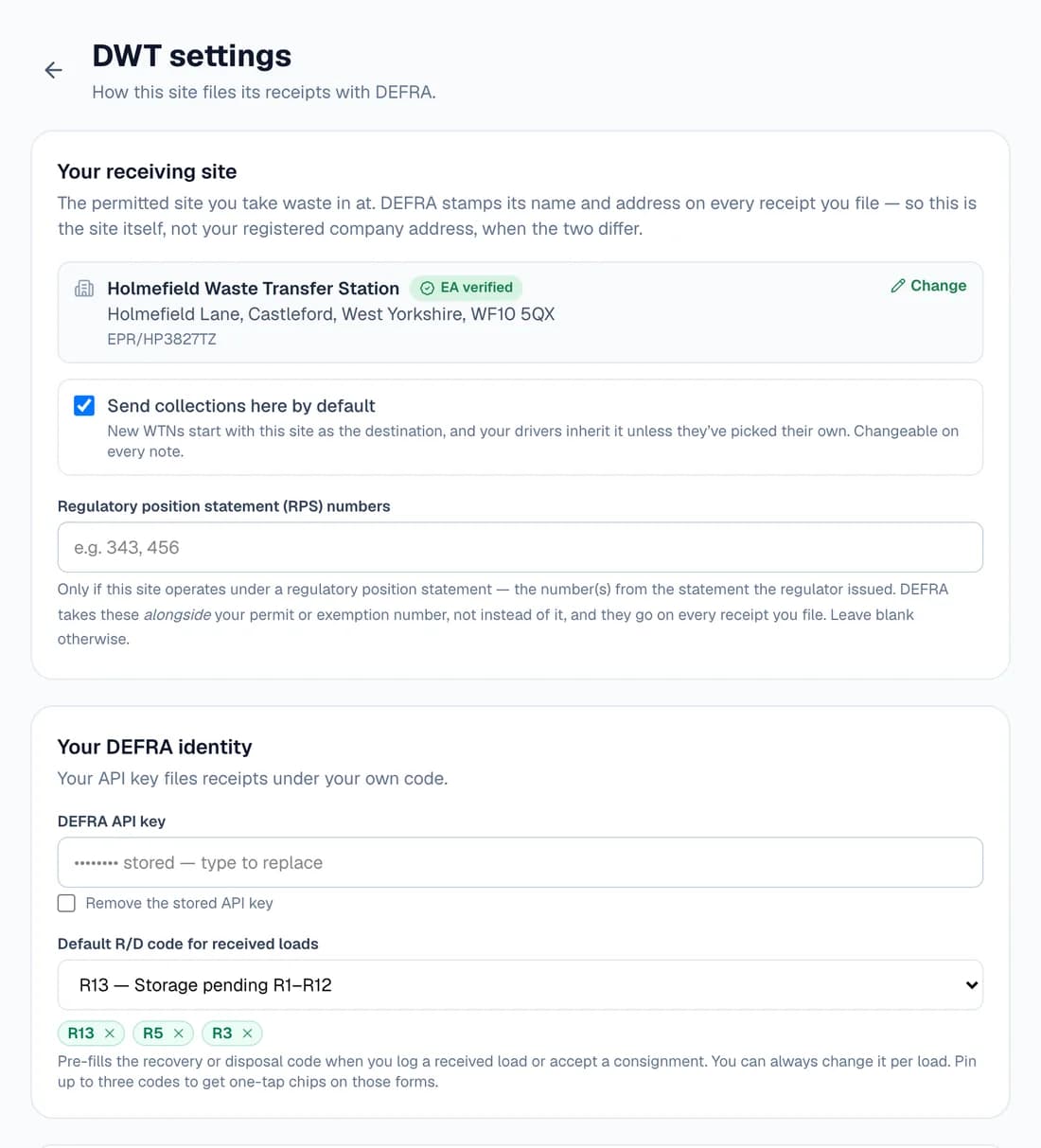
Turn on the Waste Receiver role in Settings, then open Digital Waste Tracking → Settings. Find your permitted site on the Environment Agency register, so DEFRA is told the site's own address rather than your registered office. A site that isn't on it, such as one outside England, can type its permit number instead.
Add the API code DEFRA issues when you register your site for its report-receipt-of-waste service. It's stored encrypted and never shown again. Choose the R/D code most of your loads get, and pin up to three you use most.
Step 2: Log each load that comes in
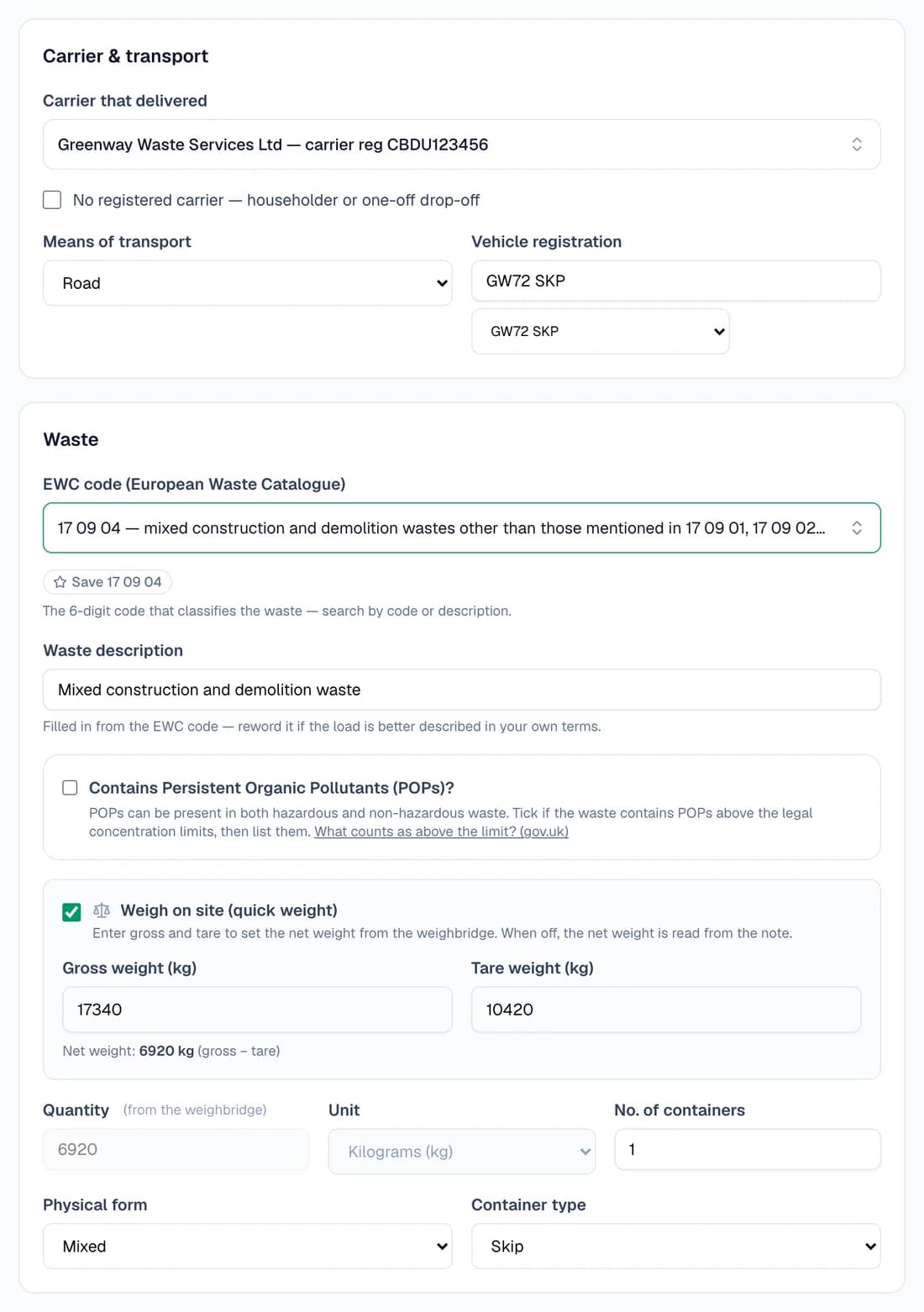
Choose Log a received load. Pick the carrier from your Carriers list, and their registration and usual vehicle come with them. Choose the EWC code, and if the lorry goes over your weighbridge, enter gross and tare to get the net weight.
Add the time it arrived and the R/D code, then Save & file receipt. The form checks the load against DEFRA's rules before you save, and says what's missing if anything is.
- A carrier who isn't in your list can be entered for that load, or found on the public register.
- A householder or one-off drop-off with no carrier registration takes DEFRA's reason instead.
- A hazardous EWC code saves the load as a consignment note, and files the same receipt.
- Attach the paper note or a PDF, or photograph it with your phone from the QR code on the form.
Step 3: Brought it back yourself? Record the receipt on the note
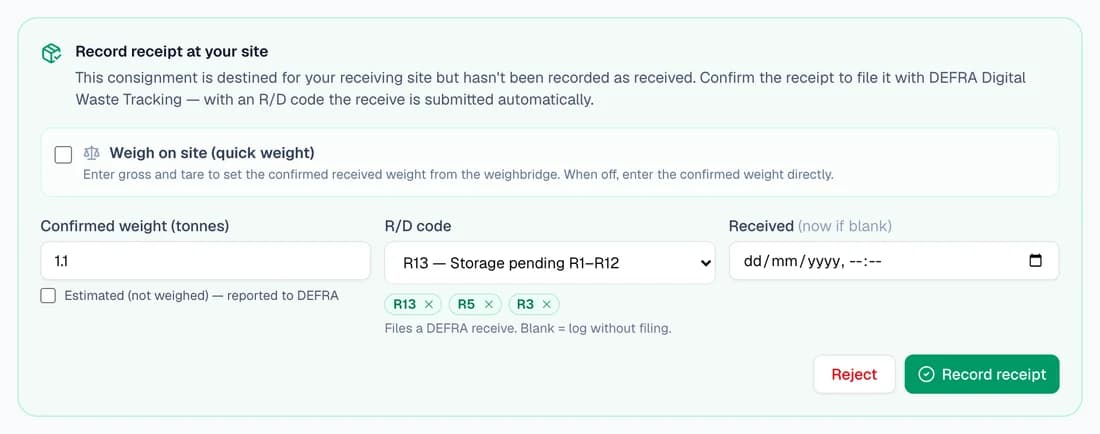
When your own lorry tips a collection at your own site, the note shows Record receipt at your site. Confirm the weight, or weigh it on site, choose the R/D code and record it. The receipt files the same way.
Tick Send collections here by default in DWT settings and new notes start with your site as the destination. Leave the R/D code blank if you only want to log the receipt without filing it.
Step 4: It files itself, and you can see it did
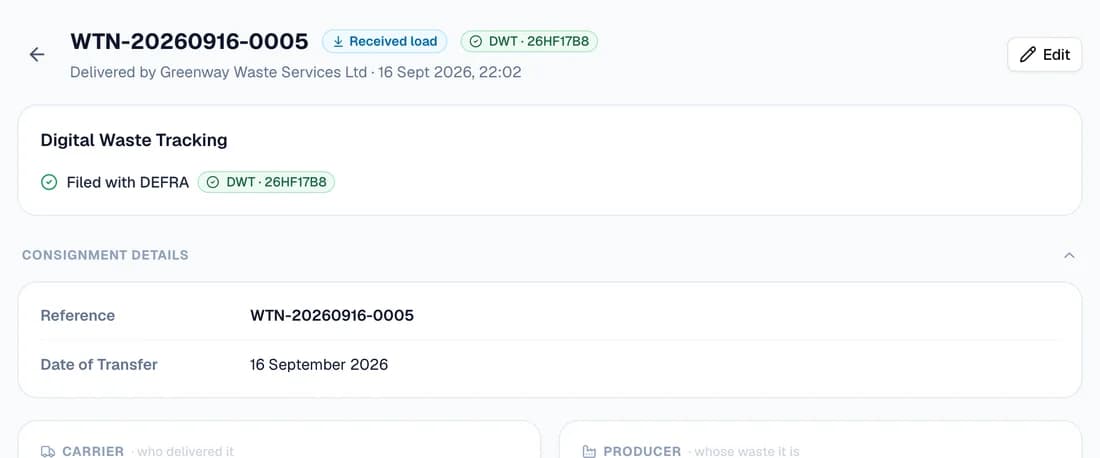
Saving the load starts the filing in the background, so there's nothing to submit by hand. When DEFRA accepts it, its waste tracking ID shows on the note and in the list.
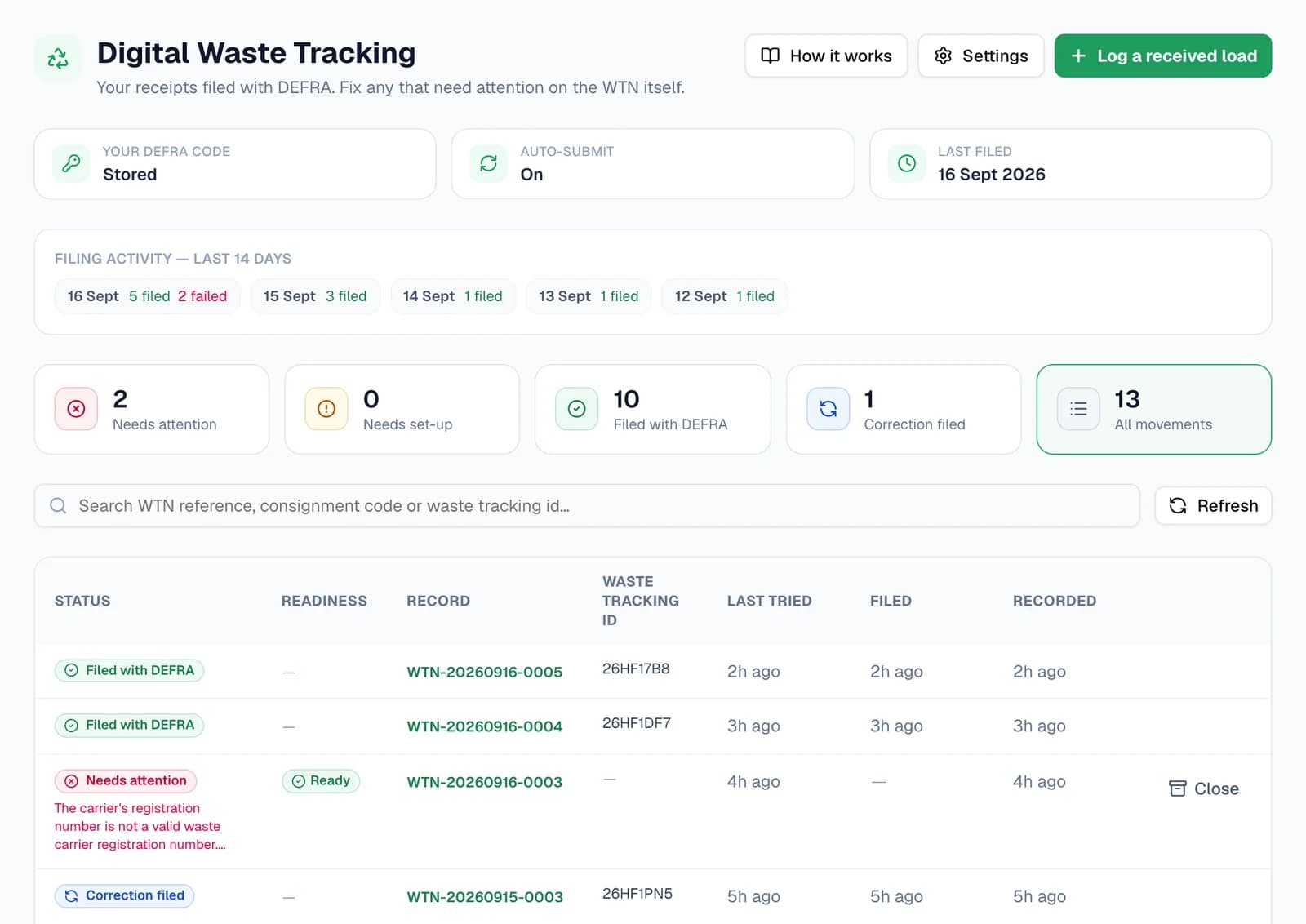
The Digital Waste Tracking page lists every receipt with its status and 14 days of filing activity. The tiles jump straight to the ones that need attention, and you can search by WTN reference or tracking ID.
Step 5: When one can't file, fix it on the note
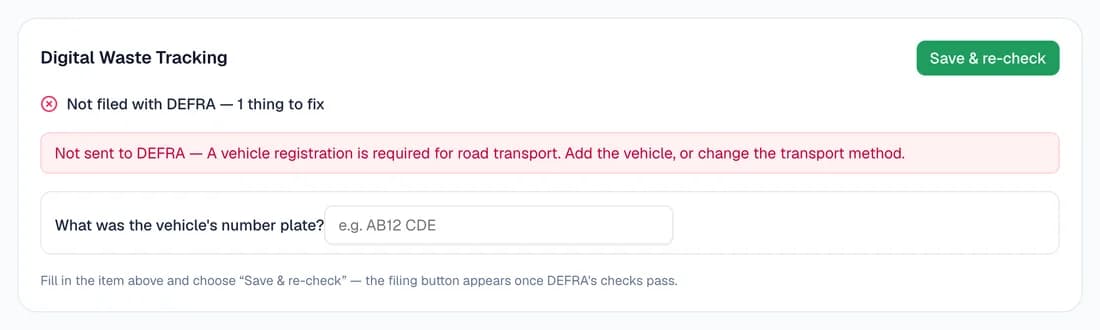
A receipt that doesn't go through shows as Needs attention, with the reason in plain English. The note's Digital Waste Tracking card turns the problem into a question, here the missing number plate, and Save & re-check runs the checks again before you file.
A correction changes what DEFRA is sent, never the signed note. When a waste transfer note fails for a reason you can fix, WTNcloud also emails you, no more than once a day.
Step 6: Correct a receipt DEFRA already has
Spotted a mistake after it was filed? Edit the load and save. The note then offers Amend DEFRA record, which updates DEFRA's record of that movement to match, and the list shows it as Correction filed.

Where receipts come from
Three ways a load reaches your site, and one filed receipt at the end of each.
Delivered by someone else
A carrier, a builder or a householder tips at your site with a note. Log it with Log a received load.
For transfer stations, recycling sites and yards that take trade waste
Your own collections
Your lorry brings a customer's waste back to your permitted site. Record the receipt on your own note.
For skip hire and grab firms with their own permitted yard
Hazardous loads
Log it the same way with its hazardous EWC code. It's kept as a consignment note, with the hazard details DEFRA asks for.
For sites permitted to take hazardous waste
Questions
Answered from how the product actually behaves.
Which plans can file DEFRA receipts?
Every plan, including the free one. Turn on the Waste Receiver role in Settings. Each load you log counts towards your plan the same way a waste transfer note does.
Where do I get a DEFRA API code?
DEFRA issues it when you register your site for its service for reporting receipts of waste; the gov.uk page is linked from DWT settings. Paste it into DWT settings, where it's stored encrypted and never shown again.
Is anything filed when a carrier completes a waste transfer note?
No. The receipt belongs to the site that took the waste in, so it's filed when that site records the receipt with an R/D code. WTNcloud won't file a receipt for a site that isn't yours.
Will I know if a filing fails?
Yes. It shows as Needs attention on the Digital Waste Tracking page and in your dashboard notifications. For a waste transfer note that fails for a reason you can fix, we email you as well, no more than once a day.
What happens if DEFRA doesn't answer?
It isn't sent again automatically, because DEFRA may already have it, and a second send would record the load twice. It's marked as needing attention, so you can check before you try again.
Who in my team can use it?
The account owner and admin logins can do everything. Office logins can log loads and fix filings, but can't change DWT settings or use Amend DEFRA record. Drivers don't see it.
Can I do this from the phone app?
The app shows DEFRA's waste tracking ID on a note once it's filed. Loads are logged on the web, and at the desk your phone can photograph the paper note for you.