Feature guide
Ask AI
Ask your waste records a question. Get the table back.
Ask AI answers in plain English. Who are your biggest customers? Which notes still need a signature? What did a customer send out last month? Which EWC code fits this waste? It's included on every plan, the free one too, and there are no AI credits to buy.
What you can ask
Four kinds of question, all in one box. Answers about your own work come back with the table they're built from.
- Totals and rankingsTop customers, this month or last month, tonnage by EWC code, your busiest vehicle.
- Signatures still owedEvery note waiting on a signature, and who hasn't signed it.
- A customer, a vehicle, a date rangeAsk in your own words and get the matching notes back as a table.
- EWC codesDescribe the waste for the closest codes, or type a code to read its entry.
- SIC codesDescribe what a business does, or type a code to see what it covers.
- UK waste rulesAnswers drawn from GOV.UK and legislation.gov.uk, with the page quoted.
- A CSV of any tableDownload the rows behind an answer with one click.
- No AI creditsIncluded on every plan. Asking a question never adds anything to your bill.
Step by step
How it works
Step 1: Open Ask AI and pick a question
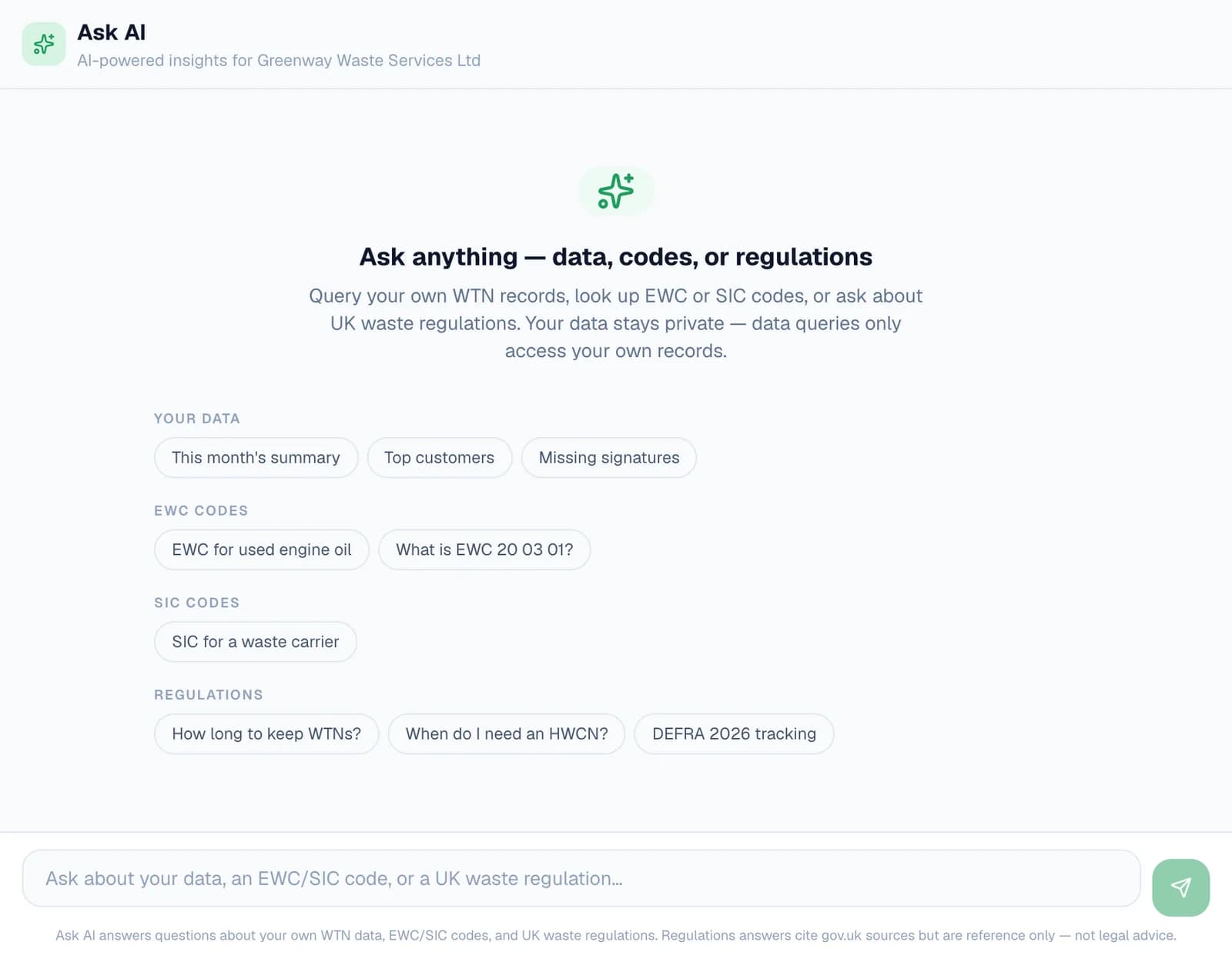
Choose Ask AI under Insights in the dashboard menu. The page opens with suggestions grouped the way it answers: your data, EWC codes, SIC codes and regulations. Click one to see the kind of question each handles.
Or type your own in the box at the bottom and press Enter. Shift and Enter starts a new line, and New chat clears the page for a fresh question.
Step 2: Get the everyday answers in one line
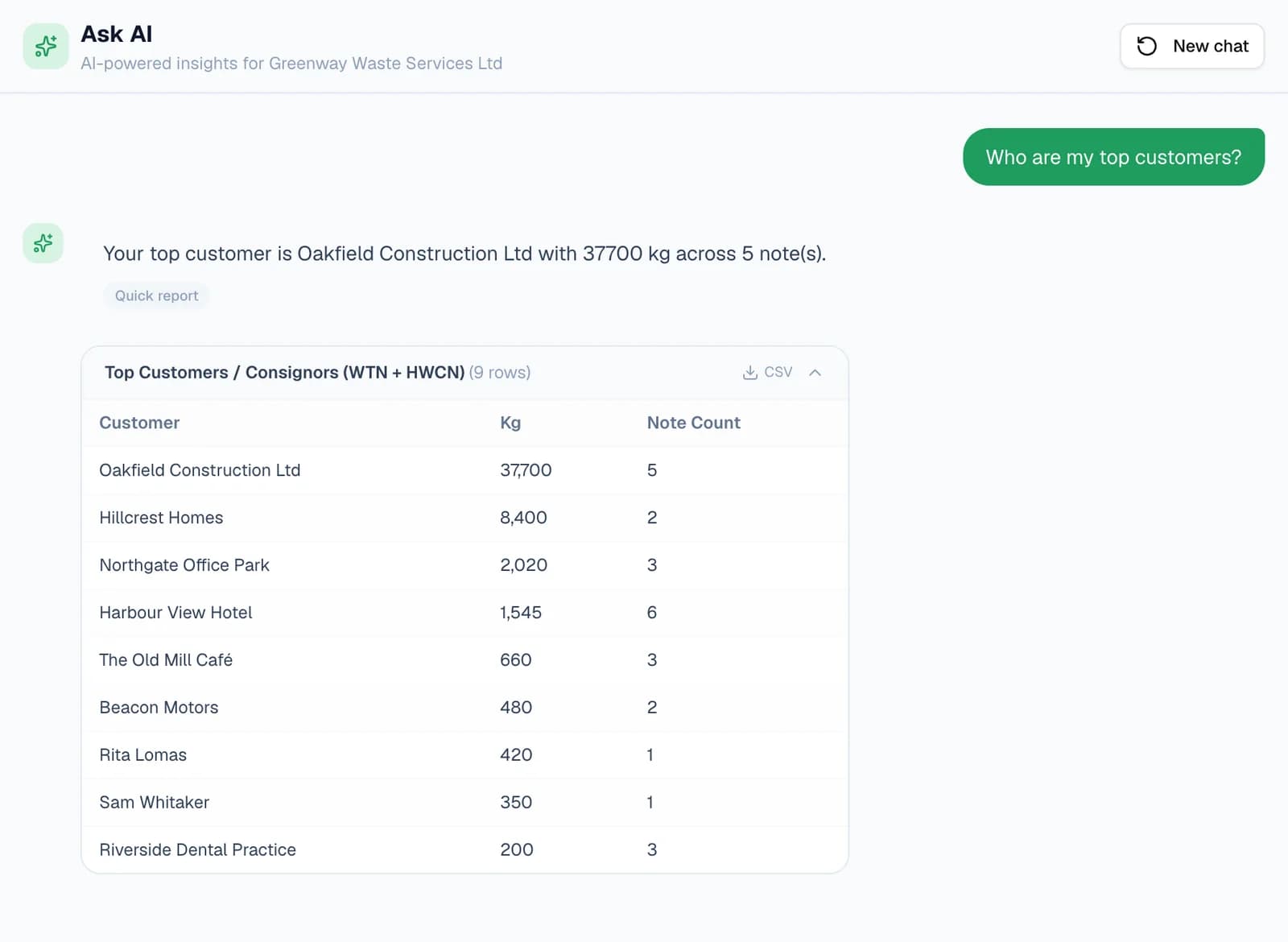
The questions you'd otherwise build a report for — top customers, this month's totals, tonnage by EWC code, hazardous waste, which vehicle carried the most — come back as a Quick report, worked out straight from your own notes.
Weights are added up properly across units and across your waste transfer notes and consignment notes. Anything measured in litres or cubic metres is converted the way DEFRA does, and the answer says that part is an estimate.
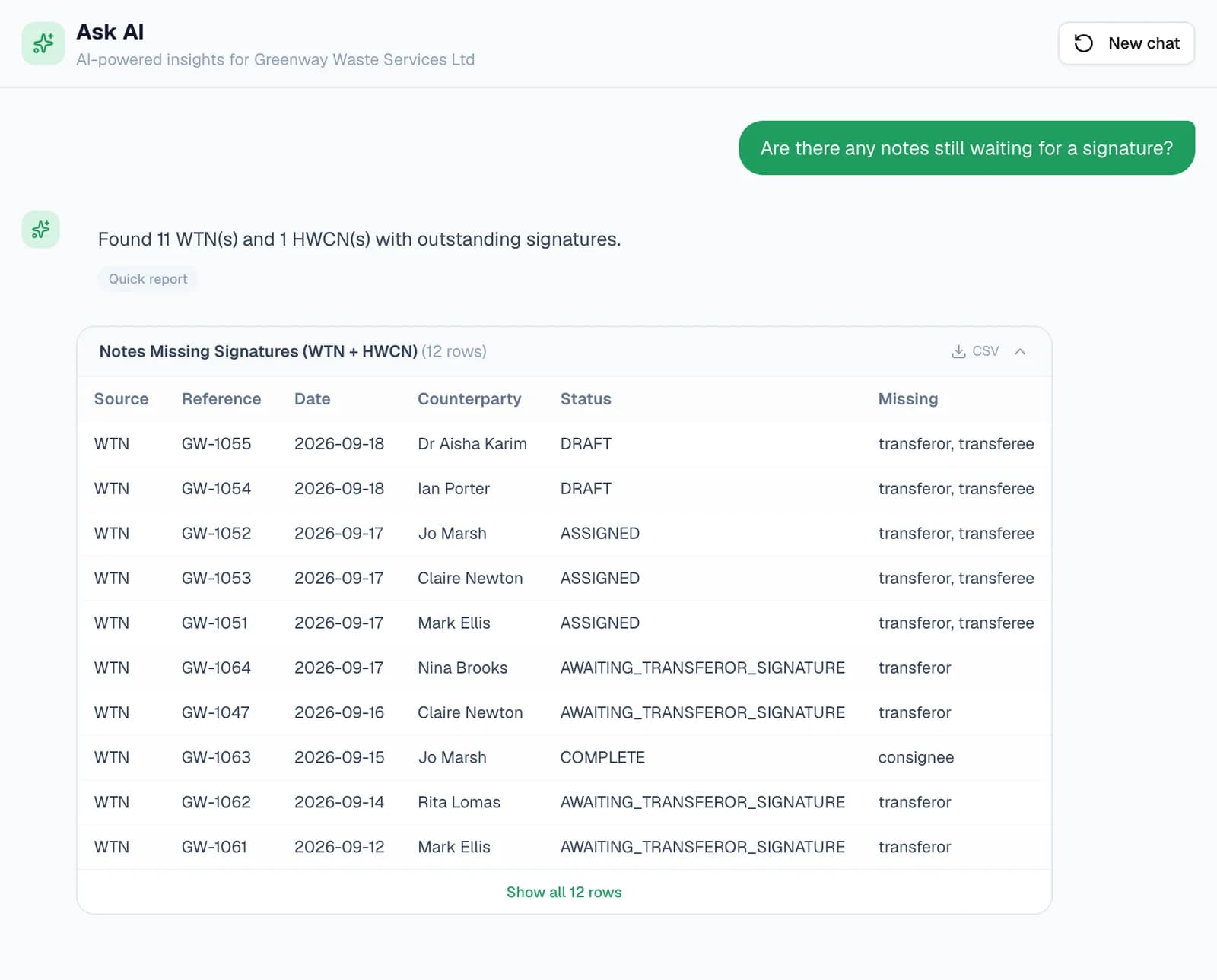
Ask which notes are still waiting on a signature and you get each one with its status and who hasn't signed: the transferor, the transferee, or the receiving site's receipt where a waste transfer note asks for one, and the consignor, carrier or consignee on a consignment note.
Step 3: Ask about a customer, a vehicle or a date range
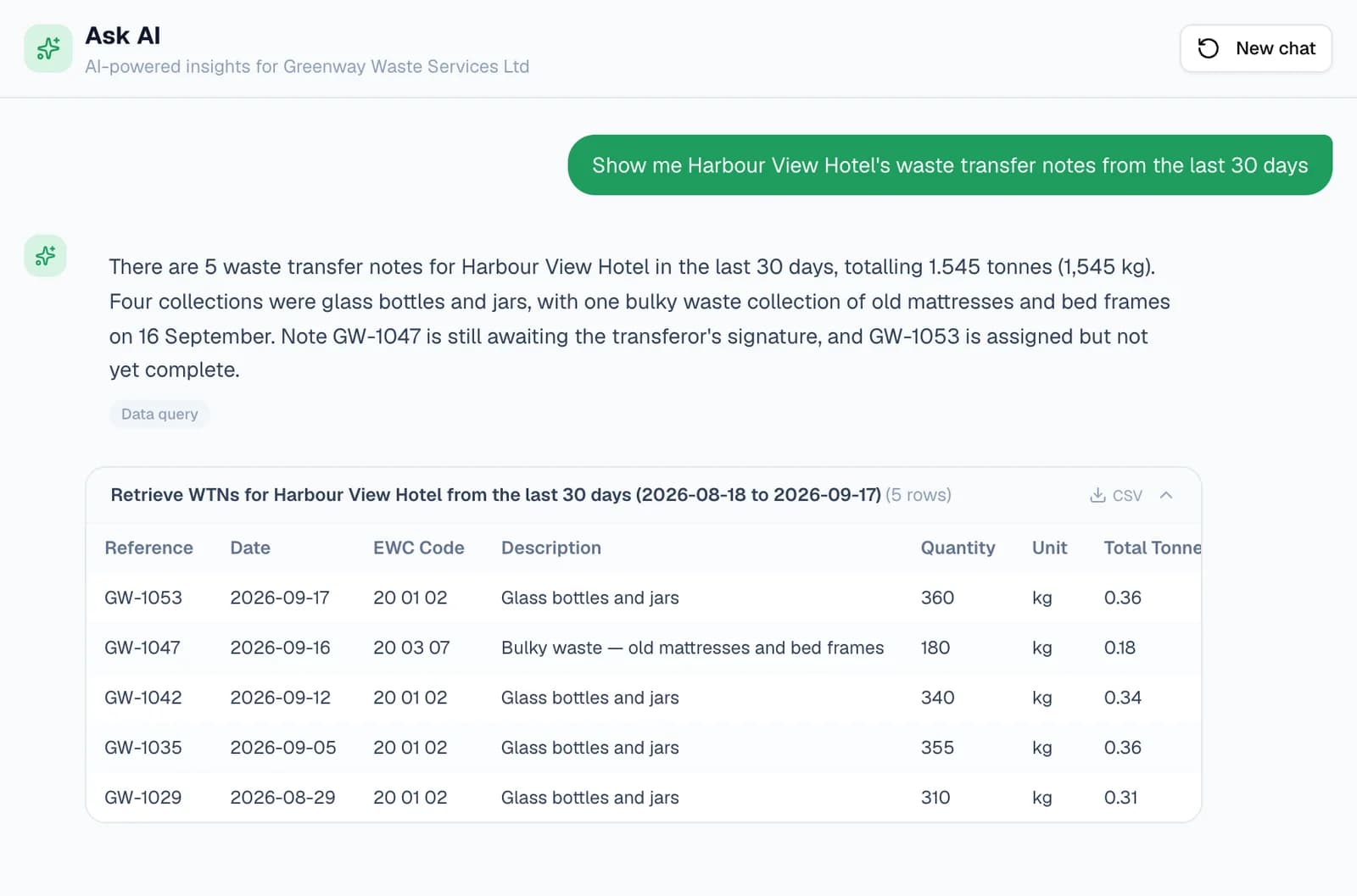
Ask in your own words, and Ask AI turns the question into a search of your records: a customer, a vehicle, a destination site, a status, the last 30 days or a particular month. The answer is marked Data query.
WTNcloud runs that search and does the adding up. The sentence at the top explains what came back, and the table under it lists the matching notes, so you can check the figures or download them as a CSV.
- Only your own account's records are searched. Office and admin logins on your account see the same records.
- Tables over ten rows show the first ten, with Show all to see the rest.
Step 4: Find the right EWC or SIC code
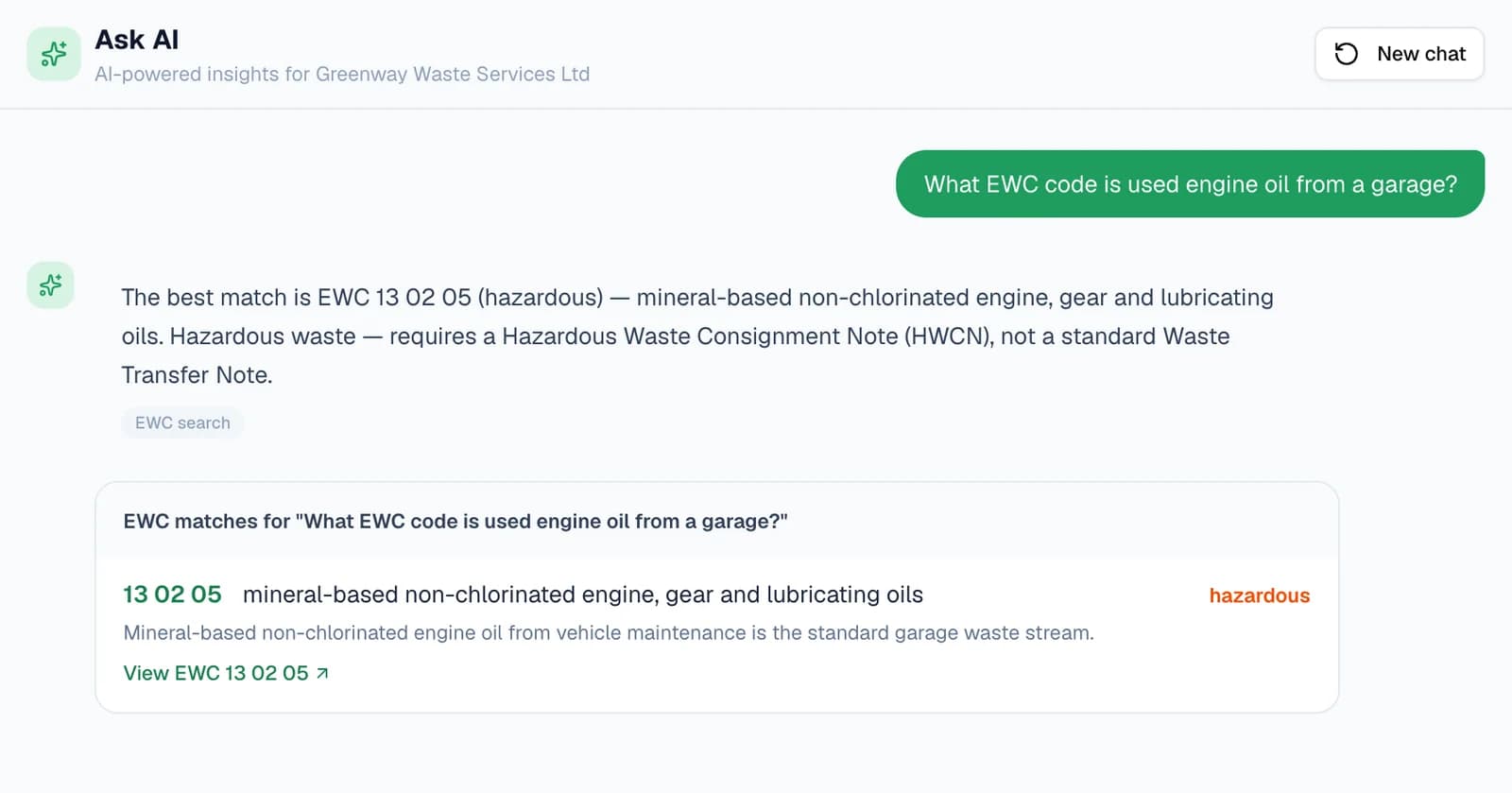
Describe the waste and Ask AI suggests up to three codes from the whole European Waste Catalogue, each with a line on why it fits, a hazardous label where it applies, and a link to the code's own page.
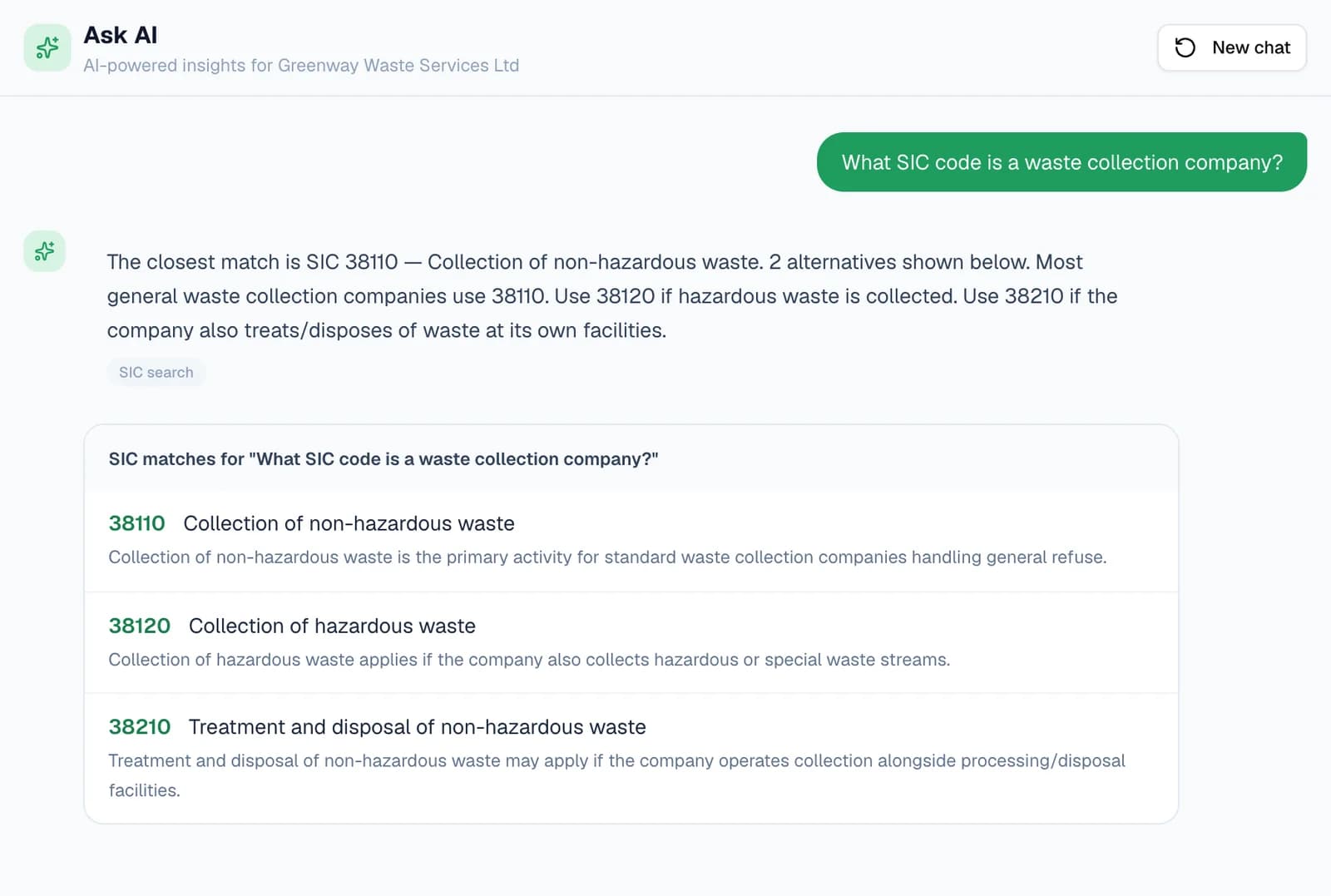
It does the same for SIC codes: describe what a business does, and it suggests up to three from the UK SIC 2007 list, closest first. Already have a code? Type it, as in “What is EWC 20 03 01?” or “SIC 38110”, to read its catalogue entry.
Step 5: Ask what the rules say
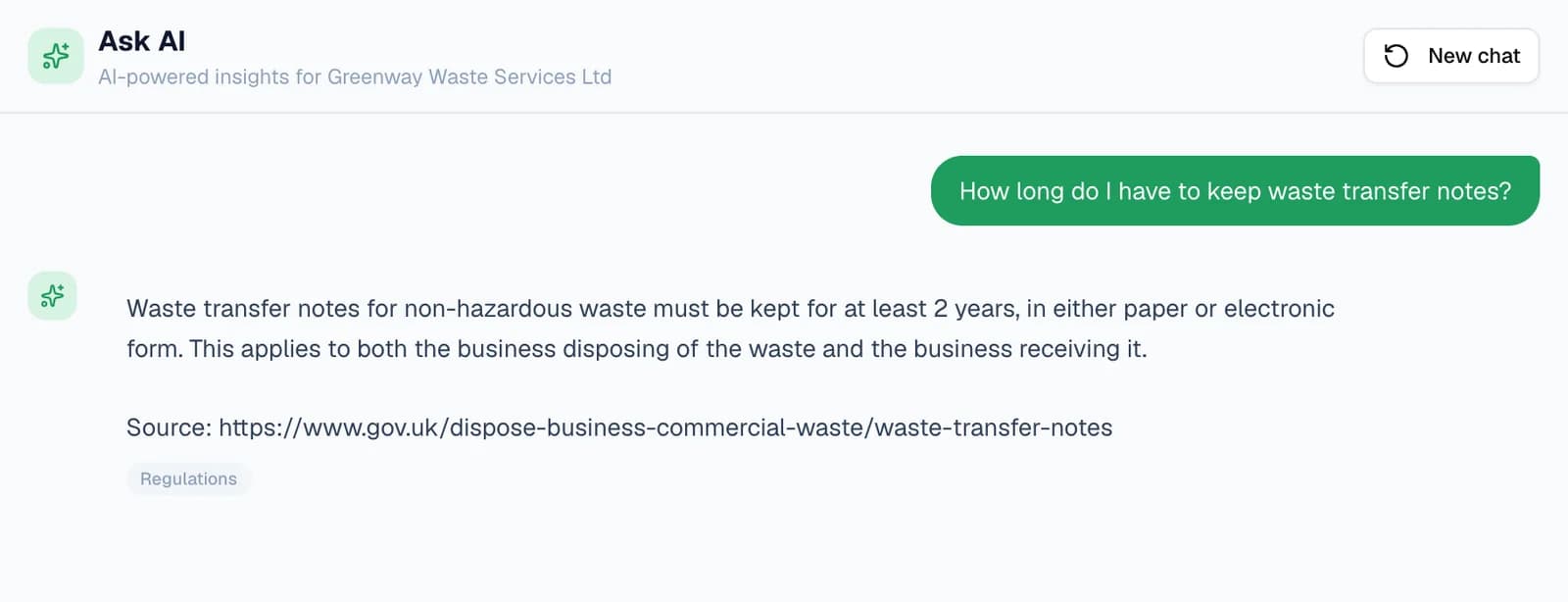
Ask about duty of care, record keeping, consignment notes, carrier registration or digital waste tracking. Answers come from a reference drawn from GOV.UK, legislation.gov.uk and Environment Agency guidance, and end with the page they're based on.
If a question isn't covered, Ask AI says so rather than guessing. Answers are for reference, not legal advice, so check anything that matters against the page it quotes.
One box, four kinds of answer
Each answer is labelled with the kind of question it took yours for.
Your records
Quick reports and your own questions about customers, vehicles, sites, dates and signatures, answered from your notes with a table and a CSV.
For owners, office and admin logins
EWC codes
The closest codes for waste you describe, each with a reason and a hazardous label, or the entry for a code you type.
For anyone writing a note
SIC codes
The code for a customer's business, from a description or a number, for the SIC box on a note.
For anyone adding a customer
UK waste regulations
Plain answers on duty of care, record keeping and consignment notes, with the GOV.UK or legislation page they come from.
For anyone checking a rule
Questions
Answered from how the product actually behaves.
Does Ask AI cost extra?
No. Ask AI is included on every WTNcloud plan, the free one too. There are no AI credits to buy or top up, and asking a question never adds anything to your bill.
Whose records can it see?
Only your own account's: your waste transfer notes and consignment notes, with their customers, vehicles and sites. Office and admin logins on your account see the same records. It never searches another account's data.
Are my records sent to an AI model?
Quick reports are worked out by WTNcloud without sending your records anywhere. For a question in your own words, an AI model turns the question into a search, WTNcloud runs it, and up to 20 of the matching rows go to the model to write the sentence above the table. We configure those requests to exclude providers that train on submitted data; our privacy policy has the details.
How do I know a figure is right?
Every answer about your records shows the table it's built from, with note references, dates and weights, and a CSV button to download it. The figures in the table come from WTNcloud, not the AI model, so check the sentence at the top against them.
What about loads measured in litres or cubic metres?
They count towards weights the way DEFRA converts them: a litre as about a kilogram, a cubic metre as about a tonne. The answer says which part of a total is estimated that way.
Is an answer about regulations legal advice?
No. Answers come from a reference drawn from GOV.UK, legislation.gov.uk and Environment Agency guidance, and quote the page they're based on. If the reference doesn't cover your question, Ask AI says so. Check anything that matters against the source.
Is Ask AI in the phone app?
The chat is on the web dashboard. In the app, the EWC code box has its own Ask AI: type what the waste is and tap “Not sure? Ask AI about …” for the closest codes. Drivers get that too.